

In short
Cisco Umbrella is a cloud security service that checks every DNS lookup your users make against Cisco Talos threat intelligence and your policy, and blocks malicious or unwanted domains before a connection starts. Its SIG packages add a web proxy, cloud firewall and CASB. It is not a VPN or antivirus.
Want help with Cisco Umbrella?
We can plan it with you or do it for you. Tell us where you are up to.
Cisco Umbrella in plain English
Cisco Umbrella is security delivered from Cisco's cloud. Instead of putting a box in every office, you send your users' internet lookups, and in the higher packages their web traffic, to Umbrella, which decides what is allowed.
Organisations mainly use it to:
- Block malware, phishing, ransomware command-and-control and cryptomining domains
- Filter web content by category for acceptable use, a common requirement in schools
- Protect laptops and Chromebooks wherever they connect, not just in the office
- See which cloud applications staff are using
- Replace on-premises web proxies and some firewall functions with the Umbrella SIG packages
Umbrella is sold in four packages: DNS Security Essentials, DNS Security Advantage, SIG Essentials and SIG Advantage.
From OpenDNS to Umbrella to Secure Access
Umbrella's roots are in OpenDNS, a public DNS resolver service with optional filtering. Cisco completed its acquisition of OpenDNS in August 2015 and its business security service became Cisco Umbrella, while Cisco's free services kept the OpenDNS name. Our OpenDNS for business guide explains how they differ.
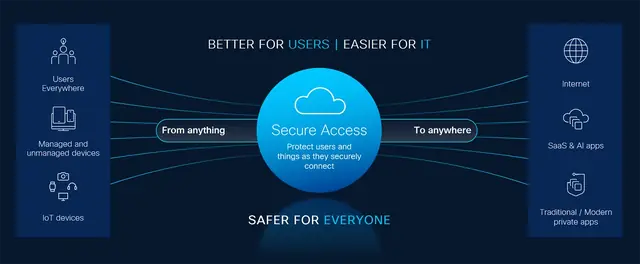
On 1 September 2026 Cisco announced that Umbrella SIG and DNS reach end of sale on 31 January 2027, with renewals possible until 31 January 2028 and support ending on 31 January 2029, as Umbrella evolves into Cisco Secure Access, Cisco's Security Service Edge (SSE) platform. See Cisco Umbrella end of life for the full timeline.
How DNS-layer security works
DNS (the Domain Name System) turns names such as example.com into the IP addresses computers need to connect. Because nearly every connection begins with a DNS lookup, it is a natural place to apply security. This is what happens when a device protected by Umbrella looks up a domain:
- The device, or your local DNS server, sends the lookup to Umbrella's resolvers instead of your internet provider's. See Umbrella DNS servers for the addresses.
- Umbrella works out who is asking. This is the identity: a registered network, a roaming computer, an internal IP or Active Directory user behind a virtual appliance, or a tunnel.
- Umbrella checks the domain against its security categories, informed by Cisco Talos, and against the content categories and allow or block lists in the policy for that identity.
- If the domain is safe and allowed, Umbrella returns the real address and the connection goes direct, with no proxy in the path.
- If the domain is malicious or blocked, Umbrella returns the address of a block page instead, so the connection to the real site never starts.
- If the domain is in the grey zone and the intelligent proxy is enabled, Umbrella sends the request through the proxy for a closer look (see below).
- Every request is logged against the identity, so it appears in Umbrella reporting.
Because the check happens at the lookup, it covers any application that resolves a domain name, not just web browsers, and it adds very little delay. Two routes around it need controlling: a connection made straight to an IP address does not involve DNS, and a browser using its own encrypted DNS (opens in a new tab) service can skip the lookup unless you manage it. That is why we review DNS over HTTPS settings and outbound DNS rules as part of every deployment.
Prefer a hand with this?
We can help you plan it and set it up, alongside your own team.
The intelligent proxy: going beyond the domain
Some domains are neither good nor bad. File-sharing and user-upload sites, for example, host mostly harmless content alongside the odd malicious file. Blocking the whole domain would stop legitimate work; allowing it all would let the threat through.
Umbrella's answer is the intelligent proxy. Cisco's security researchers maintain a dynamic list of these risky "grey" domains. When the intelligent proxy is enabled in a DNS policy, Umbrella answers lookups for those domains with the address of its cloud proxy instead of the real site, so it can block specific malicious URLs and inspect files while allowing the rest. Domains already known to be safe or malicious are never proxied, and Cisco keeps a list of popular, low-risk services (such as localised search and bandwidth-heavy SaaS apps) that are not intercepted. If you turn on SSL decryption for the intelligent proxy, devices need the Umbrella root certificate installed; without it, proxied HTTPS sites show certificate errors and do not load.
The intelligent proxy is included in DNS Security Advantage and both SIG packages. It is not part of DNS Security Essentials.
From DNS security to a Secure Internet Gateway
DNS-layer security decides whether a connection should start. A Secure Internet Gateway (SIG) also inspects what happens once it does. The SIG packages add:
- A full Umbrella secure web gateway that proxies web traffic, with selective HTTPS decryption, URL filtering, and file inspection and sandboxing
- An Umbrella cloud-delivered firewall for outbound traffic from connected sites
- Umbrella CASB controls for discovering and controlling cloud applications
- Optional Umbrella Remote Browser Isolation and, in SIG Advantage or as an add-on, Umbrella DLP
Traffic reaches the SIG through IPsec tunnels from your sites, the roaming module on laptops, or proxy chaining and PAC files. Our Umbrella SIG guide explains how the pieces fit together.
Is Umbrella a VPN, antivirus or firewall?
People often ask which box Umbrella fits into. The short answer is none of them exactly:
| Question | Answer |
|---|---|
| Is Umbrella a VPN? | No. It does not give users access to your private network or apps. The roaming module sends DNS (and, with SIG, web traffic) to Umbrella for security, and can run alongside a VPN. Zero trust access to private apps is part of Cisco Secure Access. |
| Is Umbrella antivirus? | No. It does not scan files stored on a device. It blocks malicious destinations and, with the intelligent proxy or SIG, inspects files as they are downloaded. You still need endpoint protection on every device. |
| Is Umbrella a firewall? | Partly. The SIG packages include a cloud-delivered firewall for outbound traffic from connected sites. It does not protect inbound traffic, so you still need an edge firewall. |
| Is Umbrella a web filter? | Yes. Content filtering by category, with allow and block lists, is in every package. See Umbrella DNS filtering. |
Not sure which option applies to you? Ask us
Tell us about your organisation and we will point you to the right option.
Where Umbrella fits today
Umbrella remains a straightforward way to add a strong layer of protection with little change to your network: point your DNS at it, roll out the roaming module, and you are protected on and off site. Our Cisco Umbrella setup guide walks through the options.
With the 31 January 2027 end of sale, new buyers should compare Umbrella with Cisco Secure Access before committing, and existing customers should plan their migration to Secure Access. Contact us and we will help you choose the route that suits you.
Sources (checked 11 November 2026): Cisco's DNS Security Essentials page (opens in a new tab) for DNS-layer security and Cisco Talos intelligence, its guide to how the intelligent proxy works, and its end-of-sale and end-of-life announcement for the dates and Cisco Secure Access as the successor.
DNS reference
How Forever Systems can help with Cisco Umbrella
We can supply and deploy Cisco Umbrella, help you run it, and plan the move to its successor, Cisco Secure Access.
- Package selection: Umbrella DNS or SIG, Essentials or Advantage, plus add-ons, matched to your users, sites and compliance needs
- Deployment: network DNS forwarding, virtual appliances, the roaming module in Cisco Secure Client, Chromebooks, IPsec tunnels from Cisco Meraki and other firewalls, and Active Directory, Entra ID or SAML identity integration
- Policy design: security categories, content filtering for schools and businesses, allow and block lists, and reporting
- Migration planning from Umbrella to Cisco Secure Access ahead of Cisco's end-of-sale and end-of-support dates
- Ongoing help: reporting, policy tuning, renewals and licence changes
Forever Systems is a Cisco Partner and also supplies the wider Cisco Secure portfolio, including Cisco Secure Access.
Frequently asked questions
What is Cisco Umbrella used for?
Mainly for blocking malicious domains (malware, phishing, command and control) and filtering web content by category, for users on and off the network. The SIG packages add a secure web gateway, cloud-delivered firewall and CASB, so Umbrella can also replace on-premises web proxies.
Is Cisco Umbrella a VPN?
No. Umbrella is a security service, not a remote access service. The roaming module sends lookups (and, with SIG, web traffic) to Umbrella for inspection and can run alongside your VPN. For private app access, look at Cisco Secure Access.
How does Cisco Umbrella work?
Your network or device sends its DNS lookups to the Umbrella DNS servers. Umbrella identifies who is asking, checks the domain against Cisco Talos-informed security categories and your policy, and either returns the real address or the address of a block page. Risky domains can be passed to the intelligent proxy, and every request is logged for reporting.
What are the main Cisco Umbrella features?
DNS-layer security and content filtering in every package; the intelligent proxy and Umbrella Investigate in DNS Security Advantage and above; and, in the SIG packages, a secure web gateway, cloud-delivered firewall, CASB, file inspection and sandboxing, with DLP in SIG Advantage or as an add-on and Remote Browser Isolation as an add-on. All packages include roaming protection, reporting and log export.
Was Cisco Umbrella called OpenDNS?
Yes. Cisco acquired OpenDNS in 2015 and its business security service became Cisco Umbrella. Cisco's free services still carry the OpenDNS name. See OpenDNS for business.
Is Cisco Umbrella being discontinued?
Cisco has announced end of sale on 31 January 2027 and last date of support on 31 January 2029, with Cisco Secure Access as the successor. Existing subscriptions keep working under their terms. See Cisco Umbrella end of life.
Still have a question about Cisco Umbrella?
Ask us and a member of our team will get back to you.
Explore Cisco Umbrella
 PackagesDNS Security and SIG packages side by side, with add-ons and Secure Access equivalents.
 DeploymentStep-by-step guide to the ways Umbrella is deployed: DNS, VAs, roaming, Chromebooks, tunnels and identities.
 Umbrella SIGWhat Umbrella's Secure Internet Gateway includes and how traffic reaches it.
 End of lifeEvery end-of-life milestone, what is affected and what has no replacement.