

In short
Umbrella DNS Essentials (DNS Security Essentials) is the entry Umbrella package, licensed per Covered User. It blocks malicious and unwanted domains at the DNS lookup using Talos intelligence and more than 100 content categories, on and off the network, by domain, not full URL. Forever Systems, a Cisco Partner, can quote and set up DNS Essentials in the UK.
Get a quote for Cisco Umbrella DNS Security Essentials
Tell us roughly how many users or sites you have and we will come back to you with options and a quote.
What DNS Security Essentials is
Almost every connection to the internet starts with a DNS lookup. DNS Security Essentials makes Umbrella's recursive resolvers the place where those lookups are answered. When a device asks for a domain that Cisco Talos associates with malware, phishing, command and control or another security category, or a domain in a content category your policy blocks, Umbrella returns a block page instead of the real address. Clean lookups are answered normally.
Because the decision happens before any connection is made, it works for any port or protocol that relies on DNS, not just web browsers. Umbrella's resolvers share the same anycast addresses across Cisco's global data centres, including London and Manchester, so queries go to a nearby site and fail over automatically. The detail of how this works is in our guide to what Cisco Umbrella is.
It is the entry point to Umbrella, and with Cisco's end-of-sale notice now published, a renewal is also a good moment to look at its successor in Cisco Secure Access (opens in a new tab).
What is included
Cisco's DNS Security Essentials package page and its published package listing describe it as including:
- Security categories driven by Cisco Talos threat intelligence: malware, phishing, botnets and command and control callbacks, plus high-risk categories such as cryptomining and newly seen domains
- Content filtering across more than 100 content categories, for acceptable-use policy; see Umbrella content and security categories
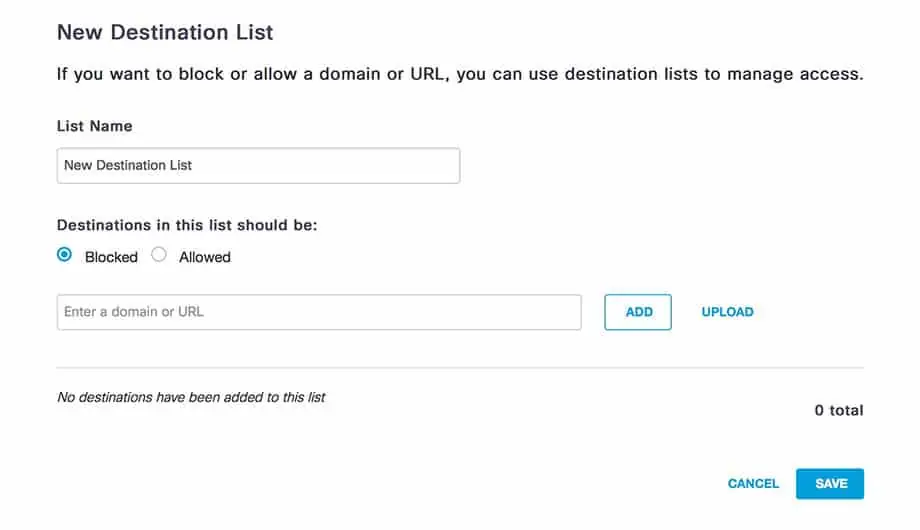
- Custom allow and block lists (destination lists) for domains you always want to permit or stop, and customisable block pages with bypass options
- On-network and off-network protection for Windows, macOS, ChromeOS, iOS and Android devices, including managed and unmanaged mobiles
- Identity-based policy and reports by network (egress IP), internal subnet, network device, roaming device and Active Directory user or group, using the AD Connector and Umbrella virtual appliance
- App Discovery report to find and block shadow IT, based on domains
- APIs and log export: the Umbrella API for reporting and integration, real-time activity search, and log export to your own Amazon S3 bucket or a Cisco-managed one
- Multi-org console for organisations that manage several Umbrella organisations; see Umbrella multi-org and MSP consoles
- Dashboard reporting on blocked and allowed activity; see Umbrella reporting
What the higher packages add
DNS Security Essentials works on domain names, which keeps it fast and simple. When you need more, the higher packages add:
- URL-level filtering. Essentials blocks whole domains; URL entries come with the intelligent proxy in DNS Security Advantage or the secure web gateway (opens in a new tab) in SIG Essentials
- HTTPS inspection and file scanning, through the intelligent proxy for risky domains in DNS Security Advantage, and for web traffic in the SIG packages
- Inspection beyond DNS. Connections that never make a DNS lookup, such as malware connecting straight to an IP address, are handled by the SIG packages, whose web gateway and cloud firewall inspect the traffic itself. Cisco retired its optional IP Layer Enforcement feature in July 2022 and points to SIG for this
- Umbrella Investigate, the console and enrichment API, from DNS Security Advantage
- Tunnels and the cloud-delivered firewall, in the SIG packages
For many organisations Essentials is the right start. Blocking at the DNS layer stops connections to known-malicious domains with almost no tuning. If you need to see inside web traffic, step up a package; our package comparison shows every row side by side.
Umbrella DNS Essentials vs Advantage, in one line: Advantage adds the intelligent proxy (URL and file inspection on risky domains) and Umbrella Investigate; everything above is the same. See Umbrella DNS Security Advantage for the detail.
Is Cisco Umbrella DNS Security Essentials the right fit for you?
We will check it against your systems and requirements and recommend the right option.
How it is deployed
There are several ways to get DNS traffic to Umbrella, and most organisations combine them:
- Point the network at Umbrella. Set your router, firewall or internal DNS servers to forward to the Umbrella DNS servers, then register the public IP as a network identity.
- Keep internal names local. Deploy at least two Umbrella virtual appliances so internal domains still resolve on your own DNS, and add the AD Connector for user and group policy.
- Protect laptops off site. Install the Umbrella Roaming Security Module in Cisco Secure Client (formerly AnyConnect); see our Umbrella roaming client page.
- Cover Chromebooks. Use Cisco Security for Chromebook, a Chrome extension pushed to managed Chromebooks.
- Build policy. Choose security and content categories, add destination lists and customise block pages; see Umbrella content filtering.
The full walk-through is in our Cisco Umbrella setup guide, and you can test all of this first with a Cisco Umbrella free trial.
Who it suits
DNS Security Essentials suits organisations that want broad protection quickly and with little ongoing administration:
- Small and mid-sized businesses without a dedicated security team
- Multi-site organisations that want one policy across every office
- Schools and colleges filtering on and off site (the Education version is covered on Umbrella for schools)
- Anyone with laptops that spend time on home and public Wi-Fi
It is often paired with endpoint protection and email security (opens in a new tab), since it does not inspect files or messages itself. Blocking connections to malicious websites can also help with the malware protection control in Cyber Essentials (opens in a new tab).
Buying DNS Security Essentials at a glance
| Buying fact | DNS Security Essentials |
|---|---|
| Licence unit | Per Covered User: one licence for each person protected (Umbrella Offer Description, section 5.1) |
| Usage allowance | Monthly average DNS query limit, per the Offer Description |
| Billing | Can be billed monthly, terms confirmed at quote |
| Cisco support tier | Cisco Support - Standard, Signature or Solution Support, chosen when you buy |
| Free trial | Set up by us with no Cisco sign-up; see our free trial page |
| Event data location | North America by default, or Europe if you choose (Cisco documentation (opens in a new tab)) |
| Last day to order | 31 January 2027; renewals and additions until 31 January 2028 (Cisco's end-of-life notice) |
| Cisco's successor | Secure Access DNS Essentials (DNS Defense) |
| How to buy | Ask us for a quote |
Not sure which licence fits? Ask us
Tell us what you need and we will recommend the right licence for your organisation, with a quote.
End of sale and the Secure Access successor
Cisco's end-of-sale date for DNS Security Essentials is 31 January 2027. Existing customers can renew or add licences until 31 January 2028, and support ends on 31 January 2029. Cisco's named migration product is Secure Access DNS Essentials, part of Cisco Secure Access DNS Defense (opens in a new tab), which Cisco says offers all Umbrella DNS features and more. Cisco also provides an automated upgrade manager for moving existing Umbrella policies into Secure Access.
See the Umbrella end of life guide and the Umbrella to Secure Access migration guide. Forever Systems can supply and deploy DNS Security Essentials and its successor. On Cisco Umbrella DNS Essentials pricing, licences are per Covered User (see Cisco Umbrella cost); contact us for a quote.
Sources (checked 11 November 2026): Cisco's DNS Security Essentials page and package overview for what the package includes; the Umbrella Offer Description for the licence unit and usage terms, and Cisco's end-of-life notice for the order and renewal dates and the Secure Access successor.
Cisco Umbrella DNS Security Essentials pricing
As the entry Umbrella package, DNS Security Essentials is priced on how many you protect and the Cisco support tier you choose. The intelligent proxy and Investigate come with DNS Security Advantage, so needing them changes the package rather than adding a line to the quote.
Our Cisco Umbrella pricing page sets out how pricing works.
Get a quote for Cisco Umbrella DNS Security Essentials
Tell us what you need and we will come back to you with a quote.
How Forever Systems can help with Cisco Umbrella
We can supply and deploy Cisco Umbrella, help you run it, and plan the move to its successor, Cisco Secure Access.
- Package selection: Umbrella DNS or SIG, Essentials or Advantage, plus add-ons, matched to your users, sites and compliance needs
- Deployment: network DNS forwarding, virtual appliances, the roaming module in Cisco Secure Client, Chromebooks, IPsec tunnels from Cisco Meraki and other firewalls, and Active Directory, Entra ID or SAML identity integration
- Policy design: security categories, content filtering for schools and businesses, allow and block lists, and reporting
- Migration planning from Umbrella to Cisco Secure Access ahead of Cisco's end-of-sale and end-of-support dates
- Ongoing help: reporting, policy tuning, renewals and licence changes
Forever Systems is a Cisco Partner and also supplies the wider Cisco Secure portfolio, including Cisco Secure Access.
Frequently asked questions
What is included in Umbrella DNS Essentials?
DNS-layer blocking of malicious domains using Cisco Talos intelligence, content filtering across more than 100 categories, custom allow and block lists, on- and off-network protection for Windows, macOS, ChromeOS, iOS and Android, Active Directory integration, virtual appliances, the App Discovery report, the Umbrella API, S3 log export and reporting.
What is the difference between Umbrella DNS Essentials and Advantage?
DNS Security Advantage adds the intelligent proxy for URL blocking, HTTPS decryption and file inspection on risky domains, and Umbrella Investigate console and API access. DNS Essentials has neither but keeps DNS-layer blocking, content filtering, roaming protection, the Umbrella API and S3 log export.
How much does Umbrella DNS Essentials cost?
It is licensed per Covered User, with a chosen Cisco support tier and a monthly DNS query allowance, so the cost depends on your user count and support level. Ask us for a quote.
Does DNS Security Essentials inspect HTTPS traffic?
No. It works on the DNS lookup only. DNS Security Advantage adds the intelligent proxy, which inspects traffic to risky domains, and SIG adds a full secure web gateway with HTTPS inspection.
Can DNS Security Essentials block a specific URL?
No. It can block a whole domain, but blocking a single URL needs a proxy, which arrives with the intelligent proxy in DNS Security Advantage or the secure web gateway in SIG.
Will DNS filtering slow down browsing?
Umbrella answers DNS queries from Cisco's global anycast resolver network, with UK data centres in London and Manchester, so a query goes to a nearby site. There is no proxy in the path, and blocked domains never load at all.
What replaces DNS Security Essentials?
Cisco's named migration product is Secure Access DNS Essentials, part of Secure Access DNS Defense. Umbrella DNS Security Essentials can be ordered until 31 January 2027 and is supported until 31 January 2029.
Still have a question about Cisco Umbrella DNS Security Essentials?
Ask us and a member of our team will get back to you.
Explore Cisco Umbrella
 PackagesDNS Security and SIG packages side by side, with add-ons and Secure Access equivalents.
 DNS Security AdvantageAdds the intelligent proxy for risky domains and Umbrella Investigate.
 Content filteringBuild an acceptable-use policy with categories, allow and block lists, SafeSearch and block pages.
 Umbrella DNS serversUmbrella resolver addresses and how to point your network at them.
 DeploymentStep-by-step guide to the ways Umbrella is deployed: DNS, VAs, roaming, Chromebooks, tunnels and identities.