
In short
The Cisco Umbrella client is the agent that protects laptops off the corporate network. The original standalone Umbrella roaming client reached its last date of support on 2 April 2025; today's client is the Umbrella Roaming Security Module in Cisco Secure Client (formerly AnyConnect), included with Umbrella's DNS and SIG packages and deployable through Intune, Group Policy or RMM.
Get a quote for Cisco Umbrella roaming protection
Tell us roughly how many users or sites you have and we will come back to you with options and a quote.
From the standalone client to Secure Client
Cisco announced the end of life of the standalone Umbrella Roaming Client (opens in a new tab) on 2 April 2024, and its last date of support was 2 April 2025. If any devices still run it, they are on unsupported software and should be moved.
The replacement is the Umbrella Roaming Security Module in Cisco Secure Client (opens in a new tab), formerly AnyConnect. Secure Client is a modular agent: a core component plus optional modules for VPN, Umbrella, diagnostics and other Cisco services. You can install the core and the Umbrella module only, and hide the VPN interface if you do not use Cisco VPN, so users see just the Umbrella module.
Cisco states that Umbrella customers are licensed to download Secure Client, and that this is included with DNS Security Essentials, DNS Security Advantage, SIG Essentials and SIG Advantage. Cisco's roaming client end-of-life guidance adds that customers with valid licences and active Umbrella support can migrate to, and use, the Umbrella module at no additional charge.
In the product
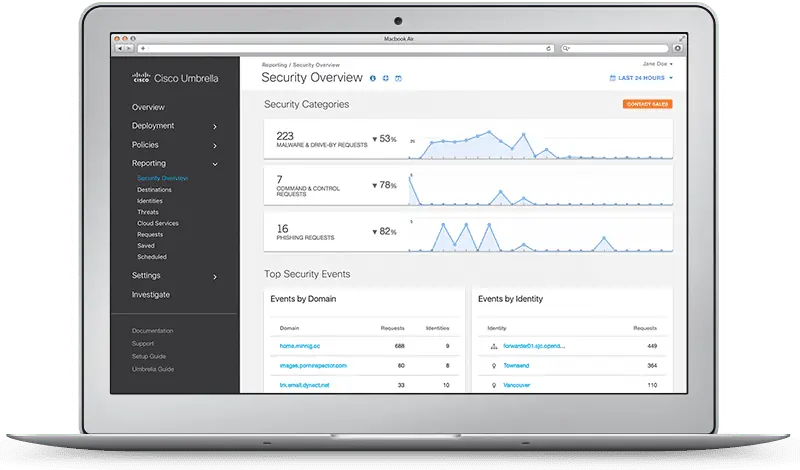
What the roaming module does
- DNS-layer protection anywhere. It sends the device's DNS queries to Umbrella on any network, so malicious and blocked domains are stopped at home, in hotels and on public Wi-Fi.
- Identifies the device and user. Each laptop appears as a roaming computer identity, and with directory integration the logged-in user is recorded, so policy and Umbrella reporting can be per person.
- Web protection with SIG. In the SIG packages, Secure Client's web security (SWG) module forwards web traffic to the Umbrella secure web gateway for full proxy inspection, not just DNS.
- Works alongside VPN. Cisco says the module does not need Cisco VPN and is highly compatible with third-party VPNs. It can also stand down while a Cisco full-tunnel VPN session is active.
- Understands trusted networks. On the office network it can defer to the network policy rather than applying its own (see below).
- No data centre to configure. Umbrella's resolvers use anycast addressing, which Cisco says sends requests to the nearest data centre with automatic failover, so there is nothing to set per country or region.
Download and install with Intune, Group Policy or RMM
To download the Cisco Umbrella client and install it at scale, the pattern is the same whatever tool you use:
- Download Secure Client from the Umbrella dashboard (Deployments, Core Identities, Roaming Computers). Use the pre-deployment (predeploy) installers, which install silently and suit mass deployment.
- Download your organisation's module profile, the OrgInfo.json file, from the same page. It ties each installed module to your Umbrella organisation.
- Package the core installer and the Umbrella module installer. The core is always needed because every module depends on it, but you can hide the VPN interface if you do not use Cisco VPN. Add the diagnostics (DART) module for easier troubleshooting.
- Copy OrgInfo.json into the Umbrella module's folder on each device as part of the install.
- Push the installers silently through Microsoft Intune (opens in a new tab) (Win32 app on Windows, or a macOS package with configuration profiles), Group Policy software installation, or your RMM tool.
- Install the Umbrella root certificate if you use the intelligent proxy or SIG web inspection, so HTTPS block pages and decryption work without browser warnings.
- Pilot with a small group, confirm devices appear under Roaming Computers, then roll out widely.
On macOS, the module needs system extension and network permissions approved; with Intune or another mobile device management tool you approve these in advance through configuration profiles so users are not prompted. Cisco also documents deploying Secure Client with Umbrella protection to Android devices through MDM. Before removing the legacy standalone client, follow Cisco's uninstall guidance so the two do not conflict. To update the client later, push the new Secure Client installers through the same tool, piloting first. Chromebooks do not use Secure Client; they use Cisco Security for Chromebook.
Behaviour behind a virtual appliance and on trusted networks
On the office network you usually want internal DNS and the Umbrella virtual appliance to handle lookups, so internal names resolve and reports show internal IP addresses and AD users. The roaming computer settings in the Umbrella dashboard include a set of backoff settings for exactly this:
| Setting | What it does |
|---|---|
| Backoff behind virtual appliance | When the module detects a VA, DNS goes through the local network and the VA. With it off, DNS still goes to Umbrella but web traffic does not. |
| Customer trusted network | You publish an internal-only subdomain. If it resolves to a private (RFC 1918) address, the module turns off its DNS and web redirection and defers to the network. |
| Protected network detection | Turns off the module's DNS-based protection, including the intelligent proxy, on a network Umbrella already protects with a higher-priority policy. |
| Secure Client trusted network detection | Uses the trusted network detection in your Cisco VPN profile to stop forwarding DNS when the network is trusted. |
| VPN detection | Stops forwarding DNS to Umbrella while a Cisco full-tunnel VPN session is active. |
Off network the trusted subdomain does not resolve and no VA is found, so the module stays on. The result is one policy model, with the network protecting devices in the office and the module protecting them everywhere else. When a device does back off, its traffic is reported under the network identity rather than the roaming computer.
Not sure which option fits? Ask us
Tell us what you need and we will recommend the right option for your organisation, with a quote.
Who needs it
Any organisation with laptops that leave the building. Hybrid workers, field staff, teachers taking devices home and executives who travel are the classic cases. If every device is a desktop on a fixed network, network-level DNS forwarding may be enough.
The roaming module is available in every Umbrella package, so you do not need SIG to protect laptops at the DNS layer. SIG adds the web module for full proxy inspection, which matters if you want URL-level filtering, file inspection or Umbrella CASB controls off network.
Secure Client, Umbrella and the move to Secure Access
Secure Client is also the agent for Cisco Secure Access, which Cisco names as the successor to Umbrella. Umbrella's end of sale is 31 January 2027 and its last date of support is 31 January 2029. Standardising on Secure Client now means the agent on your devices does not need replacing when you migrate; the modules and configuration change instead. See Umbrella to Secure Access migration and the wider Cisco Umbrella setup guide.
We package, test and roll out Secure Client with the Umbrella module through Intune, Group Policy or RMM, migrate devices off the legacy client and tune trusted network settings. Contact us to plan your roll-out.
Sources (checked 11 November 2026): Cisco's roaming client end-of-life notice for the dates and the move to Cisco Secure Client; its Secure Client download document for the packages that include it; and its end-of-life notice for the Umbrella dates.
Cisco Umbrella roaming protection pricing
Umbrella's user-based packages are licensed per user, so protecting a laptop off network with the roaming module is counted by the person, not the device. The package and the Cisco support tier set the rest of the price.
Our Cisco Umbrella pricing page sets out how pricing works.
Get a quote for Cisco Umbrella roaming protection
Tell us what you need and we will come back to you with a quote.
How Forever Systems can help with Cisco Umbrella
We can supply and deploy Cisco Umbrella, help you run it, and plan the move to its successor, Cisco Secure Access.
- Package selection: Umbrella DNS or SIG, Essentials or Advantage, plus add-ons, matched to your users, sites and compliance needs
- Deployment: network DNS forwarding, virtual appliances, the roaming module in Cisco Secure Client, Chromebooks, IPsec tunnels from Cisco Meraki and other firewalls, and Active Directory, Entra ID or SAML identity integration
- Policy design: security categories, content filtering for schools and businesses, allow and block lists, and reporting
- Migration planning from Umbrella to Cisco Secure Access ahead of Cisco's end-of-sale and end-of-support dates
- Ongoing help: reporting, policy tuning, renewals and licence changes
Forever Systems is a Cisco Partner and also supplies the wider Cisco Secure portfolio, including Cisco Secure Access.
Frequently asked questions
Is the Cisco Umbrella roaming client end of life?
Yes. Cisco announced end of life for the standalone Umbrella Roaming Client on 2 April 2024, and its last date of support was 2 April 2025. The replacement is the Umbrella Roaming Security Module in Cisco Secure Client.
Is Cisco Secure Client free for Umbrella customers?
Cisco states that Umbrella customers are licensed to download Secure Client and that it is included with the DNS Security and SIG packages. Cisco also says customers with valid licences and active Umbrella support can migrate to and use the Umbrella module at no additional charge.
Where do I download the Cisco Umbrella client?
From the Umbrella dashboard, under Deployments, Core Identities, Roaming Computers. Download the Cisco Secure Client pre-deployment installers and your organisation's OrgInfo.json profile from the same page; the legacy standalone roaming client is no longer supported.
Is there a Cisco Umbrella client for Mac?
Yes. Cisco Secure Client with the Umbrella module supports macOS as well as Windows. On macOS, pre-approve its system extension and network permissions through your MDM so users are not prompted.
Does Cisco Umbrella work with a VPN?
Yes. Cisco says the Umbrella module does not need Cisco VPN and is highly compatible with third-party VPNs. You can install the core and the Umbrella module only and hide the VPN interface, and the module can stand down while a Cisco full-tunnel VPN session is active.
How do I update the Umbrella roaming client?
The standalone roaming client reached its last date of support on 2 April 2025, so the update is a move to Cisco Secure Client with the Umbrella module. After that, update Secure Client by pushing new installers through Intune, Group Policy or your RMM tool, piloting with a small group first.
Does the Umbrella roaming module support SAML?
No. Cisco says SAML authentication is not supported with the roaming module. The module gathers user and group information from the operating system instead, which works with the AD Connector or a cloud directory integration.
Still have a question about Cisco Umbrella roaming protection?
Ask us and a member of our team will get back to you.
Explore Cisco Umbrella
 DeploymentStep-by-step guide to the ways Umbrella is deployed: DNS, VAs, roaming, Chromebooks, tunnels and identities.
 Virtual applianceUmbrella VAs forward external DNS to Umbrella, keep internal names local and add internal IP and AD visibility.
 Identities and SAMLUmbrella identities: networks, devices, tunnels, and users from Active Directory or Entra ID, plus SAML.
 Secure web gatewayFull cloud web proxy with HTTPS inspection, file scanning and tenant controls.
 End of lifeEvery end-of-life milestone, what is affected and what has no replacement.